
Enterprise Claims Data Automation with Excel, VBA, and Dashboard Reporting
- Mathew
- Feb 9
- 4 min read
How New Zealand Organisations Use Governed Excel Solutions to Improve Claims Oversight and Decision-Making
Introduction: The Enterprise Claims Reporting Challenge
Large organisations across New Zealand—particularly insurers, utilities, infrastructure providers, and regulated service organisations—manage high-volume, high-risk claims processes. These claims often originate from multiple channels, involve complex validation rules, and must withstand internal audit, regulatory scrutiny, and executive review.
While core claims systems and ERPs capture transactional data, many enterprises struggle with the last mile of claims reporting:
Consolidating data from operational systems
Identifying trends, anomalies, and outliers early
Providing management with timely, trusted insights
Enabling finance, operations, and risk teams to interrogate the data independently
This is where enterprise-grade Excel automation, combined with structured data collection and governed dashboards, delivers measurable value.
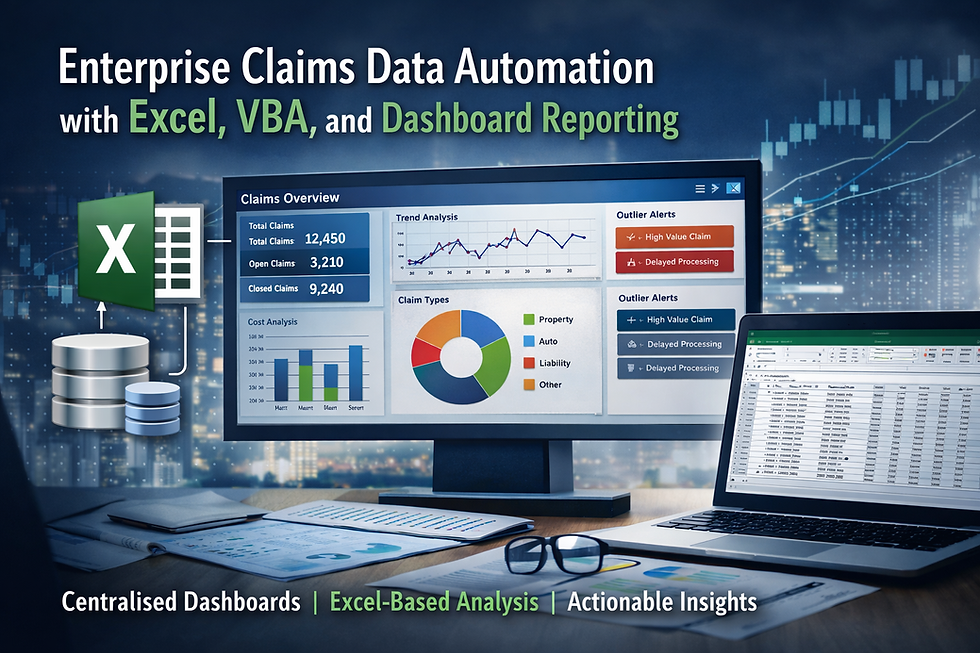
At XLS Experts, we design Excel, VBA, and Power Query solutions that operate as controlled business systems—integrated with web applications, SQL databases, and core enterprise platforms—to support reliable claims analysis and decision-making at scale.
The Problem: Claims Data Exists, but Insights Arrive Too Late
Why do enterprise claims teams struggle with reporting?
In many organisations, claims data is:
Captured in custom web applications or third-party platforms
Stored in SQL databases or data warehouses
Extracted manually into spreadsheets for analysis
Reworked repeatedly for different stakeholders
This approach introduces several risks:
Inconsistent reporting logic across teams
Manual handling errors and version control issues
Delayed visibility of adverse trends or unusual claims patterns
Over-reliance on IT teams for routine analysis requests
For enterprise leaders, the issue is not a lack of data—it is a lack of governed, accessible analytics that bridge operational systems and business decision-makers.
Why Excel and VBA Remain Highly Effective at Enterprise Scale
Is Excel suitable for large organisations?
When poorly implemented, Excel can become fragmented and uncontrolled. When designed correctly, however, Excel functions as a governed analytics and reporting layer sitting above enterprise systems.
Excel remains a strategic tool because it:
Is already embedded across finance, operations, and risk teams
Supports transparent calculations and logic review
Integrates seamlessly with SQL Server, APIs, and web applications
Enables rapid scenario analysis without ERP customisation costs
At XLS Experts, we position Excel not as a spreadsheet, but as a managed business application—built with VBA, Power Query, structured models, and controlled access.
How Claims Data Collection Works in Practice
What does a modern claims data architecture look like?
In a typical enterprise engagement, claims data flows through three governed layers:
1. Web-Based Data Collection (.NET + MS SQL)
A custom web application built on .NET with an MS SQL backend captures and validates claims data at the source. This ensures:
Standardised data entry
Mandatory fields and validation rules
Secure, auditable storage
Centralised data ownership
This layer eliminates uncontrolled spreadsheets at the data capture stage and provides a reliable “single source of truth”.
2. Management Dashboards for Oversight
From the SQL database, we design management dashboards that surface:
Claim volumes and values over time
Processing timelines and bottlenecks
Exception rates and outliers
Trends by category, region, or business unit
Dashboards are structured for executives and senior managers, focusing on decision-ready metrics, not raw data.
3. Excel-Based Analysis for Business Teams
The same claims data is securely connected to Excel using Power Query and SQL connections. This allows authorised users to:
Perform deeper analysis without altering source data
Slice and filter claims using consistent logic
Build supplementary views for finance, risk, or operations
Respond quickly to ad-hoc questions
Critically, Excel models are governed—logic is standardised, data connections are locked down, and outputs are traceable.
Why Not Rely Solely on ERP or BI Tools?
Isn’t this what enterprise BI platforms are for?
Enterprise BI tools are excellent for standardised reporting. However, they often fall short when:
Business users require rapid iteration
Analysis logic changes frequently
Detailed exception handling is required
Cost and lead time of changes are prohibitive
Excel automation fills the gap between rigid BI outputs and uncontrolled spreadsheets. It offers:
Lower cost of change
Faster deployment
Greater transparency of calculations
Strong alignment with existing staff skillsets
For many New Zealand enterprises, this hybrid approach delivers the best cost-to-value ratio.
Governance, Risk, and Auditability
How is risk managed in Excel-based enterprise solutions?
Risk is addressed through design, not avoidance. XLS Experts implements:
Role-based access to data and models
Locked calculation logic and protected structures
Version control and change documentation
Clear separation between data, logic, and presentation
This ensures Excel outputs can be:
Reviewed by internal audit
Reconciled to source systems
Maintained over time without key-person dependency
Excel becomes part of the control environment—not an exception to it.
Business Outcomes for Enterprise Organisations
What results do organisations typically achieve?
Well-designed claims automation solutions deliver:
Faster identification of emerging risk trends
Reduced manual reporting effort
Improved confidence in management information
Greater independence for finance and operations teams
Lower reliance on IT for routine analytics
Most importantly, leaders gain earlier visibility into issues that materially affect cost, compliance, and customer outcomes.
How XLS Experts Supports Enterprise Claims Reporting
XLS Experts specialises in enterprise Excel, VBA, and Power Query solutions that integrate with:
.NET applications
MS SQL Server
ERP and finance systems
Data warehouses and APIs
We are not trainers or ad-hoc spreadsheet support. We operate as automation and reporting specialists, applying systems thinking to Excel so it performs reliably at enterprise scale.
Our approach focuses on:
Long-term maintainability
Clear ownership and governance
Alignment with enterprise architecture
Practical outcomes for business users
Conclusion: Excel as a Strategic Claims Analytics Platform
For New Zealand enterprises managing complex claims environments, the question is no longer whether Excel should be used—but how it should be governed and integrated.
When combined with structured data collection, SQL databases, and disciplined automation, Excel becomes a powerful analytics platform that complements core systems rather than competing with them.
XLS Experts helps organisations unlock this value—delivering claims dashboards and Excel-based analysis that support confident, timely, and auditable decision-making at scale.


Comments