Related services: Xero and SQL Excel integrations · governed Excel systems for operations
A Governed, Scalable Approach for Enterprise Reporting in New Zealand
Executive Summary
Enterprise organisations across New Zealand continue to invest heavily in ERP platforms such as SAP, Oracle, Microsoft Dynamics, and NetSuite. Yet despite these investments, reporting teams still spend significant time extracting data, reconciling figures, correcting errors, and formatting management reports manually.
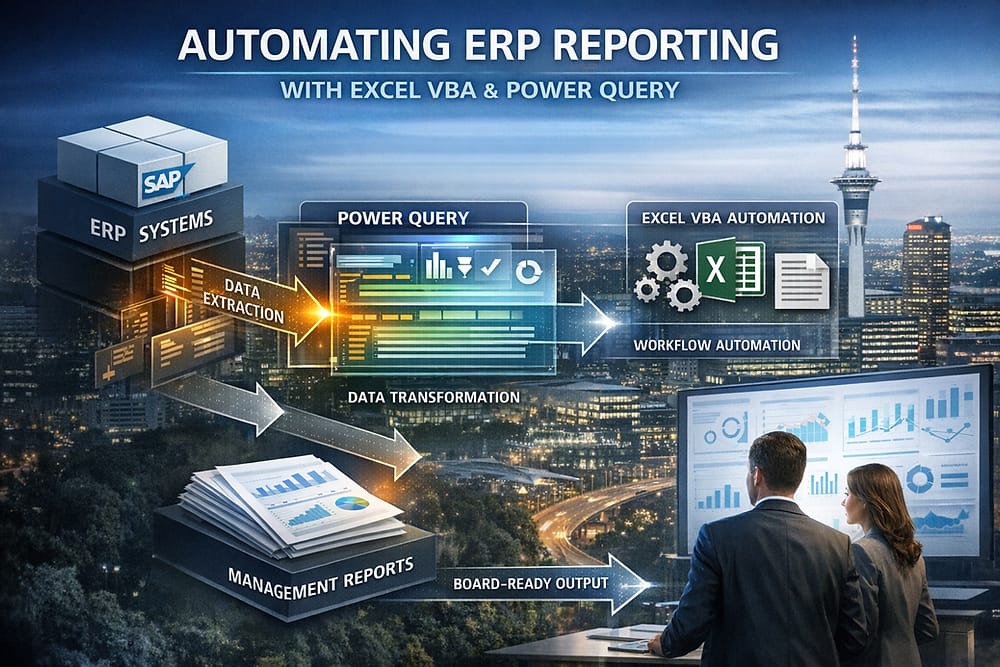
Excel—when governed and engineered correctly—remains a powerful enterprise reporting layer. By combining Power Query for automated data ingestion and transformation with Excel VBA for workflow orchestration, validation, and report generation, organisations can fully automate ERP reporting cycles from source system to board-ready output.
XLS Experts specialises in delivering enterprise-grade Excel automation solutions that integrate securely with ERP systems, reduce operational risk, and deliver measurable time and cost savings—without the complexity and expense of ERP customisation.
The Enterprise ERP Reporting Problem
Why ERP Reporting Still Fails at Scale
While ERP systems are excellent transactional engines, reporting challenges persist due to:
- Fragmented data across multiple ERP modules and instances
- Heavy reliance on manual CSV exports and spreadsheet manipulation
- High risk of formula errors and version inconsistency
- Long reporting cycles delaying decision-making
- Limited flexibility in native ERP reporting tools
For finance, operations, and PMO leaders, these issues introduce governance risk, audit exposure, and unnecessary cost.
The Hidden Cost of Manual Reporting
Manual ERP reporting workflows often involve:
- Repeated data pulls each reporting cycle
- Reconciliation across finance, operations, and planning datasets
- Manual formatting for executive and board reporting
- Rework caused by late data changes
At enterprise scale, this results in hundreds of staff hours per month and increased exposure to compliance and reporting errors.
Excel as a Governed Enterprise Reporting Layer
Reframing Excel’s Role in the Enterprise
Excel is often misunderstood as a “desktop tool.” In practice, when architected correctly, Excel becomes:
- A governed reporting interface
- A controlled automation layer
- A flexible presentation and modelling environment
- An auditable, repeatable reporting system
XLS Experts positions Excel not as an alternative to ERP, but as a strategic reporting extension that sits above core systems.
Power Query: Automated, Repeatable ERP Data Ingestion
Direct ERP Data Connectivity
Power Query enables automated connections to:
- ERP databases (SQL Server, Oracle, SAP HANA)
- ERP APIs and OData feeds
- Data warehouses and reporting views
- Secure flat file drops from ERP jobs
Once configured, data refreshes are consistent, traceable, and repeatable.
Standardised Data Transformation
Power Query handles:
- Data cleansing and validation
- Column standardisation across entities
- Period-based filtering
- Currency and unit normalisation
- Exception flagging
Transformations are documented and version-controlled, improving auditability and maintainability.
Eliminating Manual Data Preparation
By replacing ad-hoc Excel formulas and copy-paste processes, Power Query removes a major source of reporting errors while ensuring consistency across departments.
Excel VBA: End-to-End Reporting Automation
Orchestrating the Full Reporting Workflow
Excel VBA acts as the control layer that:
- Triggers Power Query refreshes
- Validates data completeness and integrity
- Applies business rules and controls
- Generates management-ready reports
- Distributes outputs securely
This enables a single-click or scheduled reporting process, removing dependency on individual staff members.
Automated Report Formatting and Output
VBA automates:
- Board and executive report formatting
- Multi-entity consolidation workbooks
- PDF and PowerPoint output generation
- Secure file naming and archiving
Reports are produced consistently every cycle, aligned to enterprise branding and governance standards.
Embedded Controls and Error Handling
Enterprise-grade VBA solutions include:
- Data reconciliation checks
- Exception logs and alerts
- User access controls
- Locked calculation logic
This significantly reduces operational and audit risk.
Governance, Auditability, and Risk Management
Designed for Enterprise Control Environments
XLS Experts builds Excel automation solutions that support:
- Clear separation of data, logic, and presentation
- Documented data sources and transformations
- Role-based access and protection
- Version control and change management
These principles align with internal audit, SOX-style controls, and enterprise IT governance frameworks.
Reducing Key Person Risk
Automated, documented reporting systems reduce reliance on individual analysts and ensure continuity across staff changes.
ERP Customisation vs Excel Automation: Cost and Risk Comparison
Why Not Customise the ERP?
ERP reporting customisation often involves:
- High development and consulting costs
- Long implementation timelines
- Dependency on specialist ERP skills
- Reduced flexibility for evolving business needs
In contrast, Excel-based automation delivers:
- Faster deployment
- Lower total cost of ownership
- Business-user accessibility
- Adaptability as reporting needs change
For many organisations, Excel automation provides the optimal balance between control, cost, and agility.
Common Enterprise Use Cases
XLS Experts regularly delivers ERP reporting automation for:
- Monthly and quarterly financial reporting
- Management dashboards and KPI packs
- Project cost and capital reporting
- Operational performance reporting
- Regulatory and audit support reporting
Each solution is tailored to the organisation’s ERP landscape, governance requirements, and reporting cadence.
Why Enterprise Organisations Choose XLS Experts
New Zealand-Based, Enterprise-Focused
XLS Experts works with New Zealand enterprises and international clients delivering:
- Enterprise-grade Excel and VBA architecture
- Secure ERP and database integration
- Scalable Power Query data models
- Long-term maintainable solutions
Business-First, Not Tool-First
Solutions are designed around:
- Reporting outcomes
- Risk reduction
- Time savings
- Decision-quality improvement
Technology is applied pragmatically to solve real enterprise problems.
Conclusion
ERP systems are foundational, but reporting excellence requires flexibility, control, and automation. When implemented with governance in mind, Excel VBA and Power Query provide a powerful, enterprise-ready reporting layer that eliminates manual effort, reduces risk, and accelerates decision-making.
For organisations seeking to modernise ERP reporting without costly system customisation, Excel automation—delivered by experienced specialists—remains a strategic and proven solution.